How LAGO
looks + sounds.
Honest surf talk needs honest packaging. Real photos, real titles, one pink, lots of black. If a thumbnail would embarrass you in front of the guest, it doesn’t go up.
01 · Logo


Do
- Use the supplied files only. SVG for Canva and web, PDF for print.
- Clear space on every side = half the height of the logo.
- Minimum size: 120 px wide on screen, 40 mm in print. Merch: 55 mm cap front, 95 mm chest.
- Put it on flat black or a calm part of the photo. One logo per image.
Don’t
- Recolour, stretch, tilt, outline, add shadows or glow.
- Retype it in a font. It’s a drawn mark.
- Put it over busy water, faces or text.
- Lock it up with sponsor logos in thumbnails. Sponsors live in the description.
02 · Colour
60% black. 30% real photo. 10% pink. That’s the whole system.
Pairings that work
- Pink on Ink — 7.1:1 contrast. Safe at any size.
- Paper on Ink — 17:1. All body text on dark.
- Ink on Pink — 7.1:1. Buttons, chips, the newsletter block.
Pairings that fail
- Pink on white or paper — 2.5:1. Unreadable. Use black text instead.
- White on pink — 2.8:1. Same problem.
- Any second accent colour. No yellow, no red, no gradients.
03 · Type
All caps. Italic. Tight line-height. Max 6 words. One word can go pink.
Sentence case. Captions, descriptions, the site.
Small caps-style labels only: episode number, category, guest role, date.
All three are free Google Fonts. Archivo’s expanded width only exists in the web version. In Canva, use Archivo Black in italic for headlines. It’s the closest match.
04 · Voice + titles
Two mates who know comp surfing talking straight. Funny, specific, never breathless. The name says it: honest surf talk.
Title formula
- The real question or topic + who’s on it or which event.
- Under 60 characters so it doesn’t truncate on Spotify/YouTube.
- The thumbnail headline is 2–5 words. The title can carry the detail.
- If a guest is on, their name is in the title. Names beat hype.
Clickbait → LAGO
THE TRUTH ABOUT THE SURF INDUSTRY
Is the surf industry in crisis? w/ Sam GriffithsKelly Slater’s Masterplan + The WSL’s Biggest Threat???
Kelly Slater’s masterplan + the WSL’s biggest threatYOU WON’T BELIEVE WHO MADE THE CUT
Trestles recap: who made the cut
Off the table
- “The truth about…” / “Exposed” / “You won’t believe”
- Question marks stacked up (???) or !!! for drama
- Shocked faces, open mouths, pointing fingers
- Red arrows, red circles, red scribbles
- Other brands’ logos or shopfronts as background decoration
- Torn paper, newspaper collage, fake film grain, crumpled textures
- Glow, rim light, lens flare, heavy HDR, “cinematic” haze
- Yellow-on-black meme type, drop shadows, 3D text, outlines on text
- Anything that promises more than the episode delivers
05 · Image guide
One look, every platform: black ground, one real photo, one short headline, one pink tag.
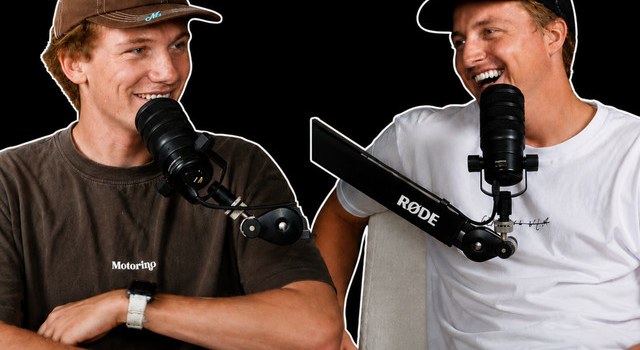
The four templates
Real photo of the guest at the mic, or a guest-supplied surf shot. Guest name in the tag. Headline is the topic, not a quote out of context.
Real surf photo from the event, with credit and permission. Event + stage in the tag (“Peniche · CT preview”). Headline is the question you answer.
The actual board/product on Paper or Bone, shot flat or 3/4. No hands-in-frame stock. Model name in the headline.
Zac + Fin from the studio shoot. For recaps, Q&As and fantasy picks. Change the expression to suit, not the scene.
Layout rules
- Black band across the bottom third (16:9) or the middle (9:16). Headline sits in it.
- Headline: 2–5 words, Archivo Black italic, caps, Paper colour, one word pink max.
- Tag above headline in Plex Mono on a pink chip: episode number + guest or event.
- Logo small, same spot every time: top-right on 16:9 and 4:5, bottom-right on 9:16. Same spot so the feed looks like a set.
- Max two faces. Natural expressions — laughing beats “shocked”.
- Real photos only: studio shoot, guest-supplied, or licensed surf photography with credit.
- Mild colour grade only: contrast up a touch, no filters, no HDR.
- Read it at phone size (about 160 px wide) before you post. If it doesn’t read, cut words.
Sizes
| Format | Pixels | Ratio | Note |
|---|---|---|---|
| YouTube thumbnail | 1280 × 720 | 16:9 | Keep text off the bottom-right 200 × 80 — YouTube puts the run time there. |
| Instagram post / carousel | 1080 × 1350 | 4:5 | Default for feed. Carousels: same template every slide. |
| Reel / Story / TikTok | 1080 × 1920 | 9:16 | Keep headline inside the middle 1080 × 1350 — the grid crops reels to 4:5. |
| Square (Spotify clips, X) | 1080 × 1080 | 1:1 | Centre everything; edges get rounded or cropped. |
| Podcast cover art | 3000 × 3000 | 1:1 | Already done — don’t change it per episode. |
| Website share image | 1200 × 630 | 1.91:1 | Already done (og.jpg). |
Why stuff reads as “AI” — and how to spot it
- Skin that looks airbrushed or plastic
- Faces that are slightly off — wrong teeth, eyes, ears, hands
- Text inside the image that’s warped or misspelt
- Scenes that never happened (hosts in front of HQs, on a podium, at a location they weren’t)
- Everything evenly lit and over-sharpened, with no real shadows
- Busy collage with no single focal point
Fix: start from a real photo, keep one focal point, let the black do the work. Using another brand’s logos or shopfronts in a thumbnail also invites a takedown. Name them in the title instead.
06 · Canva setup
- Brand Kit (Canva Pro: Brand → Brand Kit). Name it “LAGO”.
- Logos: upload both SVGs from section 01.
- Colours: add exactly these, nothing else: D87CC4, 0B0B0B, F4F1EC, E9E5DE, 9A968F.
- Fonts: Heading = Archivo Black (italic). Subheading = IBM Plex Mono Medium. Body = Archivo. If one’s missing, download it free from Google Fonts and upload it to the Brand Kit.
- Templates: build A–D once at each size in the table, lock the logo, band and tag (Lock → position), then mark them as brand templates. Every new post starts from a template.
- Photos: make a “LAGO — approved photos” folder. Only images in there go on thumbnails.
- Turn off Canva’s “Magic” suggestions for these designs. They pull in stock and stickers.
07 · Using ChatGPT
Use it for
- Cleaning up real photos: remove a stray mic cable, extend a background to fit 9:16, fix exposure.
- Brainstorming 10 title options, then you pick and edit.
- Writing first drafts of descriptions and chapter lists from the transcript.
- Resizing a finished design for other platforms.
Never use it for
- Generating people, especially real surfers or guests.
- Generating scenes, locations or events that didn’t happen.
- Generating text inside the image. Add type in Canva instead.
- Recreating other brands’ logos or products.
Prompt: clean up a real photo
Context: This is a real photo from The LAGO Podcast studio. It will be used as a thumbnail background.
Task: [remove the cable on the left / extend the background to 1080x1920 / lift the shadows slightly].
Guidelines: Keep both people exactly as they are — faces, skin, hands, clothing, expressions. Keep natural light and shadows. Match the existing grain.
Constraints: Do not add people, objects, text, logos, glow, lens flare or HDR. Do not smooth skin. Do not change the background into a new location. If you can't do it without changing the people, say so instead.
Prompt: title options
Context: The LAGO Podcast — "honest surf talk" from Zac Wightman (ex-comp surfer) and Finley James. Audience: core surfers who follow the CT and Challenger Series. Episode notes: [paste notes or transcript summary].
Task: Give 10 episode titles and, for each, a 2–5 word thumbnail headline.
Guidelines: Lead with the real topic or question. Name the guest or event. Under 60 characters. Dry, specific, a bit of humour is fine.
Constraints: No clickbait: no "the truth about", "exposed", "you won't believe", "shocking", no ??? or !!!, no claims the episode doesn't back up, no all-caps shouting.
08 · Pre-post checklist
- Started from a LAGO template?
- Photo is real, and we have the right to use it?
- Headline 2–5 words, readable at phone size?
- Only black, paper and one pink. No other colours?
- No banned words, arrows, shocked faces or other brands’ logos?
- Title says what’s actually in the episode, and names the guest or event?
- Would we be happy if the guest saw it?
Questions or edits to this guide: [email protected]